


For make this possible you need configure an additional public IPv4 address in Ubuntu and follow this little Guide:
Guide Prerequisites:
In the Cloud Panel you have to assign an additional public IPv4 address to your server.
You have logged in to the server.
▸To configure the main IP address as static, you must change in /etc/network/interfaces the entry for eth0.
To carry out this change, enter the following:
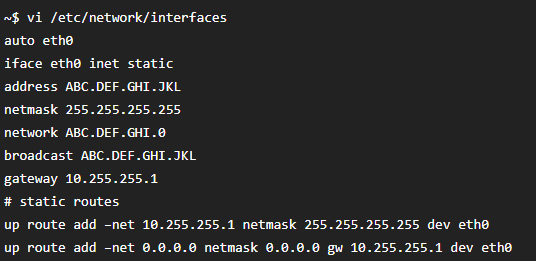
Enter your main IP address at IPADDR and BROADCAST. Enter your main IP address and the number 0 at network.
Apply the rest of the settings as indicated above.
▸To add your additional IP as an alias (eth0:0), enter the following:
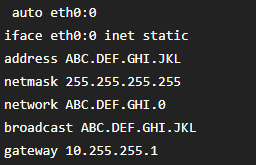
Then for finish you just need to restart the network by use this command:

If you wanna know more about this protocol: https://en.wikipedia.org/wiki/IPv4
